


Most beginner rotations are useless.
They teach you to mash buttons instead of making steady damage.
This short guide gives a simple six-step method vets use to build a beginner-friendly rotation that actually works.
You’ll learn to rank skills by avgDPS (damage divided by cooldown plus cast), draft a timeline, write a readable sequence, and test it on a training dummy.
First action: write down every skill’s damage, cooldown, and cast time.
Core Steps to Build a Beginner-Friendly Skill Rotation

Stop wasting abilities by following a six-step process. It’s the same method veterans use when they’re chasing top parses and tuning damage logs. You grab stats for each skill, rank them by efficiency, sketch a rough order, map timing on a simple timeline, write the sequence down, and test it on a dummy. That’s it.
Everything runs on one formula: avgDPS = totalDamage / (cooldown + castTime). Measure every skill this way and you’ll see which abilities deserve constant use and which ones sit on long cooldowns waiting for the right moment. Take Guild Wars 2 Engineer rifle as an example. Hip Shot does 739 damage with a 0.75 second cooldown, so 739 / 0.75 = 985.33 average DPS. That tells you Hip Shot fills every gap. Compare that to Jump Shot, which hits for 3,069 total damage but needs an 18 second cooldown plus 1 second cast time. 3,069 / 19 = 161.53 average DPS. Jump Shot bursts hard, but it can’t carry sustained damage. The avgDPS ranking makes priority obvious.
When you finish all six steps with the rifle example, the final rotation runs 26 seconds, deals 33,199 total damage, and averages 1,276.88 DPS. Those numbers give you a clean baseline to beat. Here’s the full checklist:
- Step 1, Value Skills: List each ability’s total damage, cooldown, and cast time. Calculate avgDPS for every skill.
- Step 2, Create Draft Rotation: Rank skills by avgDPS and raw burst damage. Sketch a rough priority order that keeps high-efficiency skills on cooldown.
- Step 3, Create a Timeline: Draw a simple grid with 0.25 second intervals and one row per skill. Color-code casting (yellow), cooldown (blue), and ready (white) to spot gaps.
- Step 4, Write Down Rotation: Translate the timeline into a numbered sequence you can read mid-fight.
- Step 5, Calculate DPS: Count how many times you used each skill, multiply by damage, sum it all, divide by rotation length.
- Step 6, Test & Compare: Run the rotation on a training golem, account for human reaction time, adjust the timeline if you see dead air or clipping.
Identifying High-Value Abilities for Rotation Priority

Not every skill belongs in your core loop. Some abilities deliver huge burst but sit on long cooldowns. Others fire fast and often but hit softly. The avgDPS formula separates them. High-value abilities have short cooldowns or big damage per cast window, so they contribute more damage over the length of a fight. Situational abilities offer utility like interrupts or movement, but they don’t belong in a repeating damage sequence.
Look at the rifle example numbers. Hip Shot is your filler because it resets in three quarters of a second. Blunderbuss deals 2,843 damage but needs 9 seconds of cooldown plus a half-second cast, so it scores 299.26 average DPS. That makes Blunderbuss worth pressing every time it’s ready, but you can’t spam it. Overcharged Shot hits for 1,137 damage on a 14 second cooldown with no cast time, giving it only 81.21 average DPS. You use it when it’s up, but you don’t plan around it.
| Skill | Damage | Cooldown + Cast | avgDPS |
|---|---|---|---|
| Hip Shot | 739 | 0.75 s | 985.33 |
| Blunderbuss | 2,843 | 9.5 s | 299.26 |
| Jump Shot | 3,069 | 19 s | 161.53 |
| Overcharged Shot | 1,137 | 14 s | 81.21 |
Drafting a Simple Rotation Pattern for New Players

Pick the skill with the highest avgDPS as your default filler, then layer in longer-cooldown abilities when they come off cooldown. The goal is to never let your strongest repeatable skill sit idle while you wait for something flashy. In the rifle example, Hip Shot fires 12 times in 9 seconds because 9 / 0.75 = 12. That rhythm lets you space out Blunderbuss, Overcharged Shot, and Jump Shot without losing filler uptime.
Your rotation will look uneven at first. The example rotation uses 22 Hip Shots, 3 Blunderbuss casts, 2 Overcharged Shots, and 2 Jump Shots over 26 seconds. That’s not a pretty pattern, but it keeps every cooldown moving and fills every gap with the highest avgDPS skill. You’re not trying to memorize 22 separate button presses. You’re learning “press Hip Shot until something better is ready, then go back to Hip Shot.”
Here’s the generic pattern most beginner rotations follow:
Opener: Use your longest-cooldown burst skill first so it starts ticking down immediately.
Filler loop: Press your highest avgDPS skill repeatedly while you wait for cooldowns.
Cooldown window: When a medium or long cooldown comes up, interrupt the filler to fire it, then return to filler.
Burst stack: If two or more cooldowns align, fire them back to back before resuming filler.
Repeat: Once the longest cooldown is ready again, the rotation loops from the opener.
Using Timelines and Visual Cues to Make Rotations Easier
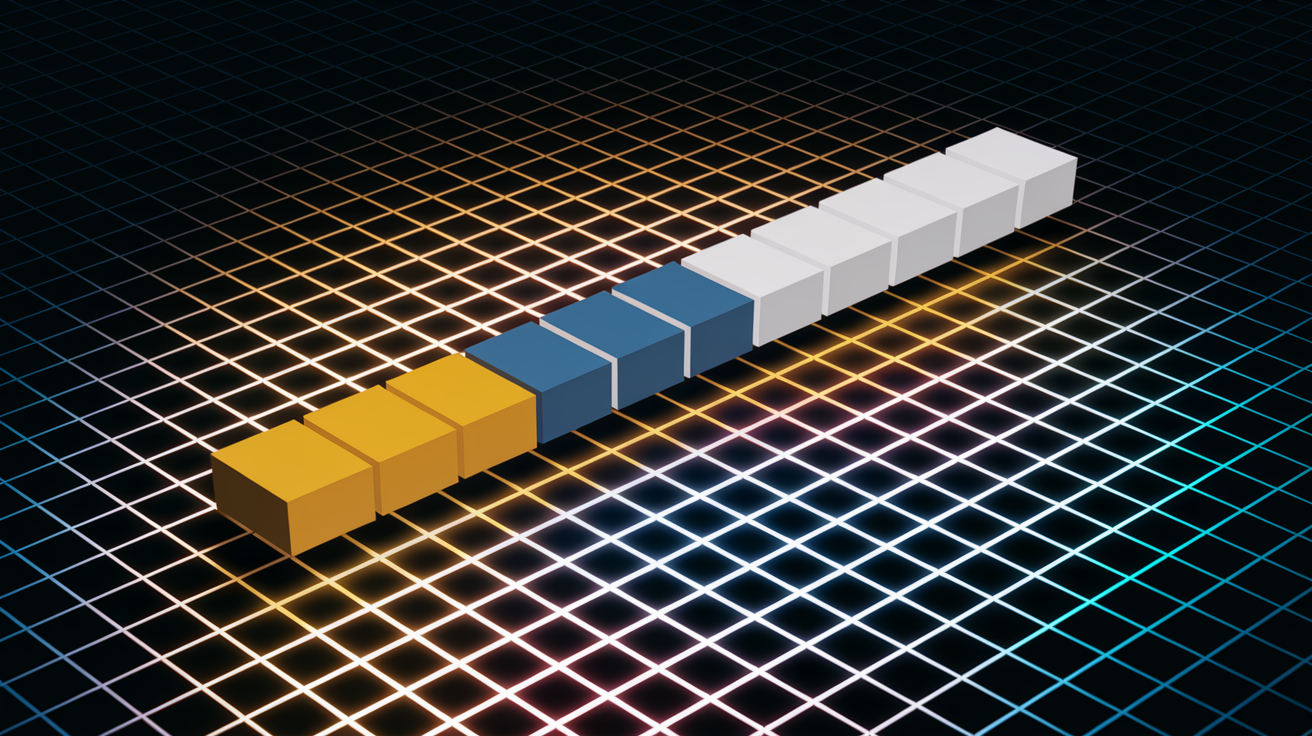
A timeline turns abstract cooldown math into something you can see. Draw a horizontal axis in 0.25 second intervals, add one vertical track for each skill, color code each state. Yellow means you’re casting. Blue means the skill is on cooldown. White means it’s ready to fire. When you scan the timeline, gaps in white space show you where filler belongs and where you’re wasting uptime.
You don’t need fancy software. A spreadsheet or graph paper works. The 0.25 second resolution matches most game ticks, so you’re modeling real cast windows and cooldown timers. If you see a two-second gap with no skills queued, you know you can fit two or three Hip Shots. If two cooldowns overlap, you see the conflict and can shift one cast earlier or later. The visual makes mistakes obvious before you ever touch a practice dummy.
For players who want digital help, here are three common visual aid types:
Overlay timers show cooldown countdowns and proc windows on screen during gameplay.
Rotation tracker addons display the next recommended skill and highlight when you skip or delay it.
Simplified bar UI replaces detailed buff icons with clean progress bars for major cooldowns and resources.
Keybinding Layouts to Support a Beginner-Friendly Rotation

Your rotation only works if you can press the buttons without thinking. Some games let you bind 72 quickslots plus 11 pet commands (like LOTRO at level cap). Others lock you to 6 total skills (ESO uses 5 regular abilities plus 1 ultimate). Either way, beginners should map their 3 to 5 core rotation skills to easy, repeatable keys and leave the rest for utility or swaps.
Put your highest avgDPS filler on 1 or your most comfortable spam key. Map medium-cooldown burst skills to 2, 3, and 4 so you can roll your fingers without repositioning your hand. Save 5 or a mouse button for your longest cooldown or defensive. Avoid scattering rotation abilities across the number row, function keys, and modifier combinations. If you have to think about where a button is, you’ll hesitate and clip casts.
Here are four keybinding rules that reduce mistakes:
Map core rotation abilities to keys 1 through 5 or Q, E, R, F for instant reach.
Use Shift or Ctrl modifiers only for situational or defensive abilities, not core damage.
Keep movement on WASD and don’t bind rotation skills to awkward reaches like 9, 0, or brackets.
Test your layout on a dummy. If you miss a key more than once in ten tries, rebind it closer.
Common Beginner Rotation Mistakes and How to Fix Them
The biggest mistake is trying to use too many skills at once. If you’re pressing more than 7 buttons in your damage loop, you’re probably adding abilities that don’t improve DPS or that only matter in niche situations. Beginners also tend to follow acquisition order, mashing keys left to right across the hotbar instead of prioritizing by avgDPS. That wastes cooldowns and leaves your best skills sitting idle.
Another common error is ignoring cooldown timing. You fire a long-cooldown ability, forget about it, then notice it’s been ready for 8 seconds while you spammed filler. The opposite problem happens when you hold a cooldown waiting for the “perfect moment” and never press it. If a skill has a 14 second cooldown, it should fire roughly every 14 seconds. Holding it costs you casts over the length of a fight.
Players also miss proc windows because they’re focused on the next button in a memorized sequence instead of reacting to what the game is telling them. And many beginners refuse to use consumables like food or potions because they “complicate” the rotation. In reality, a 5 percent damage buff from food is free DPS that requires zero extra button presses.
Here are five mistakes to watch for:
Using more than 7 active abilities in a single damage rotation before you’ve mastered the basics.
Following left to right hotbar order instead of prioritizing skills by avgDPS or cooldown.
Holding long cooldowns for burst windows that never come, costing you total casts.
Skipping easy proc conditions because you’re tunnel-visioned on a memorized sequence.
Refusing consumables or passive buffs that give reliable percent gains with no extra complexity.
Practice Drills and Rotation Training for Consistency
Muscle memory builds through repetition, not theory. Set a timer for 10 to 15 minutes, pick a training dummy, run your rotation until the button sequence feels automatic. Start with five clean reps where you don’t move and focus only on hitting the right skills in the right order. Then do five reps while strafing or dodging to simulate real combat pressure. The goal is 80 to 90 percent correct execution under practice conditions before you add more complexity or test in actual content.
Track your performance each session. Write down your total damage or DPS after every dummy run so you can see whether you’re improving. If your numbers stay flat or drop, you’re either clipping casts, missing cooldowns, or adding unnecessary buttons. Go back to the timeline, check for gaps, simplify. When you hit your baseline consistently, add one more cooldown or situational ability and repeat the drill cycle.
Testing on a golem or target dummy also reveals human reaction time. The timeline assumes instant casts and perfect timing, but real players have 100 to 200 milliseconds of delay between seeing a cooldown ready and pressing it. That’s normal. If you see small dead windows on your parse, adjust your mental cue to fire the next skill slightly earlier.
Here’s a simple five-step daily practice routine:
Warm-up (2 minutes): Press each skill once on the dummy to confirm keybinds and check cooldowns.
Static drill (5 reps): Stand still, run the full rotation five times without movement, record damage or DPS for each rep.
Movement drill (5 reps): Repeat the rotation while strafing, dodging, or repositioning to simulate real fights.
Cooldown focus (3 minutes): Practice only the opener and first cooldown window until the timing is automatic.
Benchmark run (1 attempt): Do one clean 60 to 90 second dummy session and log the result to compare against previous days.
Beginner-Friendly Tools: Addons, Macros, and Trackers

Addons and macros can simplify rotations without doing the work for you. Cooldown trackers put timers on screen so you don’t have to watch tiny buff icons. Rotation reminder addons highlight the next suggested skill based on priority rules you configure. If your game allows it, simple macros can combine pet commands or conditional abilities into one button, reducing the total number of keybinds you need to manage.
Don’t use tools that play the game for you or automate decision-making. The goal is to reduce unnecessary complexity, like remembering exact cooldown durations, while you focus on movement, positioning, and reacting to mechanics. A good addon shows you information faster. A bad addon makes choices for you and stops you from learning why those choices matter.
Most games have a few standard tools beginners can safely install:
Cooldown and buff trackers display large, clear timers for your most important abilities and procs.
Rotation or priority helpers suggest the next skill to press based on a priority list you set up, useful while you’re learning the order.
Combat log parsers record your damage, uptime, and cast counts so you can review what went wrong after a fight.
Measuring Rotation Performance and Adjusting Over Time

Numbers tell you whether your rotation is working. The rifle example produces 33,199 total damage over 26 seconds, which averages to 1,276.88 DPS. That’s your baseline. Every practice session should either match or beat that number. If your DPS drops, you’re clipping casts, missing cooldowns, or adding skills that dilute efficiency. If it climbs, you’ve tightened timing or fixed a mistake.
Run a 60 to 90 second dummy test once or twice a week and log the results. Look for steady 5 to 15 percent weekly growth as you smooth out execution and optimize keybinds. When your numbers plateau, it usually means you’ve hit the skill ceiling for your current rotation and it’s time to add one more cooldown, include a buff or debuff, or test a small variation.
Gear upgrades and stat changes will shift your damage, so re-run your baseline after major equipment swaps. If a new piece adds haste or critical strike, your filler might cast faster or your burst skills might crit more often, changing the optimal rotation length or priority order.
| Metric | What It Means | Beginner Goal |
|---|---|---|
| Total Damage | Sum of all skill hits during the rotation window | Match or exceed your calculated baseline (e.g., 33,199) |
| Average DPS | Total damage divided by rotation length in seconds | Achieve 80 to 90% of your theoretical max in practice (e.g., 1,150+ if max is 1,276.88) |
| Uptime % | Percentage of time spent casting versus idle or moving | Reach 85% or higher uptime on a static dummy before adding movement drills |
Final Words
In the action, you learned a six-step method: pick value skills, draft a rotation, build a 0.25s timeline, write the loop, calculate DPS, and test on a practice target.
The Engineer rifle example shows why simple priority ordering beats clutter, and the guide also covers timelines, keybinds, common mistakes, practice drills, and beginner-friendly addons.
Use this checklist as your go-to for [game] how to create a beginner-friendly skill rotation — run dummy tests, track small gains, and tweak with gear or patches. You’ll see cleaner runs and steady improvement.
FAQ
Q: What is the easiest game to make for beginners?
A: The easiest game to make for beginners is a simple 2D puzzle or clicker built with drag-and-drop engines like Construct, Godot, or Unity templates—few mechanics, low art needs, quick playtest cycles.
Q: How to make a skill-based game?
A: To make a skill-based game, design tight responsive controls, clear failure feedback, consistent rules, meaningful risk-reward, practiceable mechanics, and rising skill ceilings; iterate with short playtests to tune timing and precision.
Q: How to guide to help someone learn a new skill?
A: A how-to guide should break the skill into small steps, show a demo, give short focused drills with corrective feedback, set measurable goals, and space practice with gradually increasing difficulty.
Q: What is rotation in Mobile Legends?
A: Rotation in Mobile Legends is moving between lanes and jungle to apply pressure, secure objectives, gank enemies, and farm efficiently; rotate when lanes push, opponents misposition, or major objectives spawn.